💼Pro guides
How Tradespeople Get Jobs in Israel: Tasks, Direct Contacts, and Premium
By KABLAY Editorial · · 9 min read
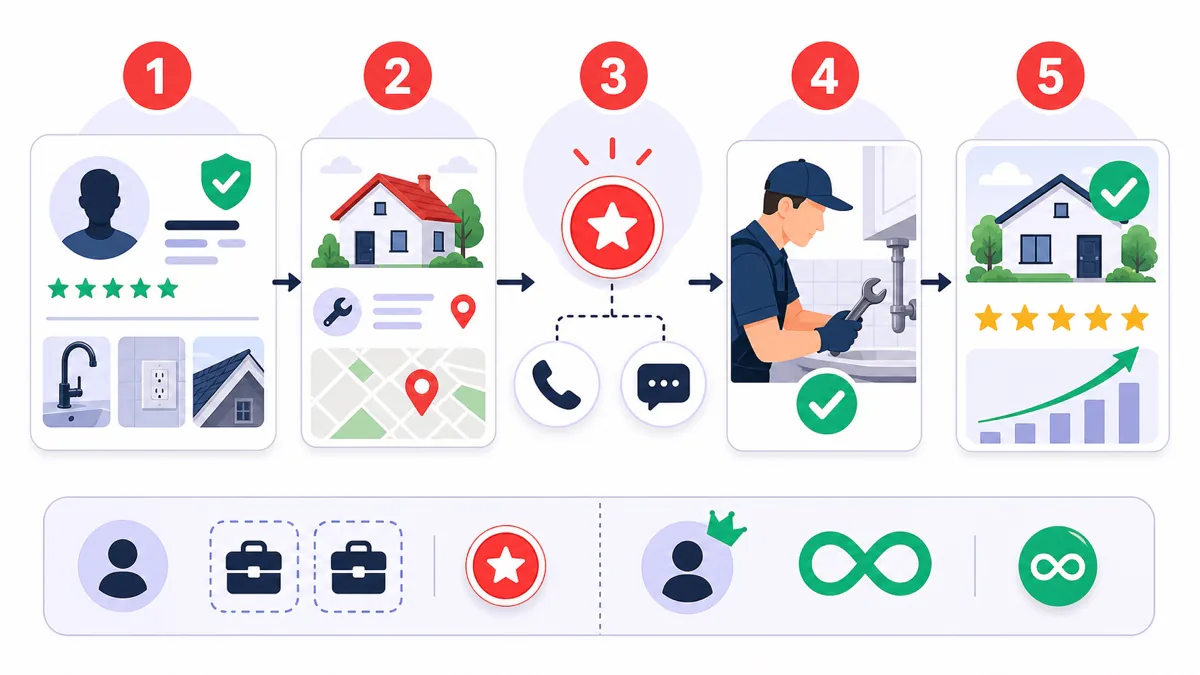
A good tradesperson does not need another noisy lead board. They need to tell quickly whether a job fits, get a direct way to speak with the client, and keep their schedule under control. KABLAY has two clear channels: available tasks matched by trade and area, and direct enquiries from a public profile.
This guide explains how to build a profile that creates trust, when to unlock a contact, how points work, why phone and WhatsApp are shown separately, and the practical difference between Standard access and Premium. KABLAY takes no commission from the work amount; client and specialist agree and pay directly.
Clear profile → suitable task → contact unlock → completed work → reviews. The first response to a task costs 5 credits on every plan; Premium removes charges for public-profile enquiries.
Where clients come from: two clear channels
Clients publish a short brief with trade, city, timing, photos and an optional budget. You browse free and unlock only the jobs that fit.
A client who finds you in the catalog can reveal your phone or open WhatsApp as two separate actions and contact you directly.
A profile that answers questions before the call
Before opening a contact, a client needs to understand three things: what you do, where you work, and why they can trust you. A complete profile filters poor-fit enquiries and makes the first call more productive.
- A real, clear portrait — visible face, good light, no logo in place of a person.
- Precise trades — choose only the work you actually perform.
- City and service area — say where you travel and at what times.
- Portfolio — 6-10 explained before-and-after pairs beat dozens of context-free photos.
- Concrete bio — job types, experience, equipment, languages and warranty.
- Trust data — phone, documents or license where relevant, and published reviews.
- Current availability — if you cannot take work this week, update the status.
Channel 1: available jobs — browse free, unlock selectively
Browsing available tasks is free. Before unlocking, check the city, work type, timing, photos, property access, and whether a particular license is required. The goal is not to open the most tasks; it is to choose jobs where you can give a useful answer quickly.
With Standard access, a task contact currently costs 5 points and reveals both the client phone and WhatsApp. There is no second charge for the same task. If the client cancels an unlocked task before work begins, the contact charge is refunded automatically.
Channel 2: phone and WhatsApp from your public profile
On a public profile, clients see two separate actions: reveal the phone number or open WhatsApp. With Standard access, the specialist is charged at the current rate shown in the product. Both channels share the same daily bucket, so the same visitor opening the second channel that day is not charged again.
Charging is limited to one unique visitor and specialist pair during one calendar day in Israel time. Raw IP addresses are not retained for deduplication; the system uses a hash. Premium specialists are not charged points for these profile contact opens.
Points without surprises
- A specialist receives 50 welcome points after creating a profile.
- Points are an internal access unit for contact opens; they are not cash and cannot be withdrawn.
- The cost is shown before the action. The public-profile contact rate can change through system settings.
- Your billing screen shows balance, purchases, charges and refunds.
- Simply browsing tasks never spends points.
Standard or Premium: match the plan to your workload
- Free task browsing
- Point-based contact opens
- No fixed active-job limit
- No subscription and 0% commission on the job
- Public-profile enquiries without credit charges
- The first task response still costs 5 credits
- Phone and WhatsApp available on the public profile
- Client ratings and Google Reviews are available to all specialists
- 0% commission on the job
There is no fixed active-job cap. Premium makes sense when clients regularly open your public-profile contact; the first response to a task still costs 5 credits. In the iPhone app, Premium is an Apple monthly subscription that renews until cancelled in Apple settings; the local price and terms appear before purchase.
After the unlock: a 10-minute contact routine
- Introduce yourself and your trade, and mention the task or profile that brought the client to you.
- Confirm the problem: what happened, when it started, what was tried, and whether photos exist.
- Confirm logistics: city, address, parking, floor, lift, and access to the panel, roof or main valve.
- Discuss timing and budget: urgent or planned visit, call-out fee, materials and a possible range.
- Agree on the next step: short video call, site visit, written estimate or more photos.
- Update the status: mark “I took the job” only after agreement, or “No agreement” if it is not a fit.
KABLAY messages can support the process and preserve an important detail, but they should not delay a direct conversation. Once phone or WhatsApp is available, reach a practical understanding quickly and document the agreement afterward.
A 7-day plan to start a steady flow
- Day 1: complete portrait, trade, city, service area and availability.
- Day 2: upload at least six jobs with a short explanation for each.
- Day 3: browse without unlocking and learn which briefs genuinely fit.
- Day 4: unlock only relevant tasks and use the call routine above.
- Day 5: review balance, charges, refunds and active-job count.
- Day 6: ask a satisfied client to complete the job and leave a factual review.
- Day 7: review what worked — job type, city, response time and profile quality — then update the profile.
Less inbox time, more direct conversations
The model is simple: build a profile that explains your work, browse tasks free, unlock only relevant contacts, and close every job with a status and review. The first task response costs 5 credits for every specialist; Premium removes only public-profile enquiry charges. Create a specialist profile and get 50 welcome points.
Frequently asked questions
- Does browsing tasks cost points?
- No. Browsing available tasks is free. With Standard access, points are spent only when you unlock a task contact or when a unique visitor opens contact details on your public profile at the shown rate.
- What does a task contact unlock include?
- One unlock reveals both the client phone and WhatsApp. The current Standard cost is 5 points, with no second charge for the same task.
- Am I charged twice if a visitor opens phone and then WhatsApp?
- Not for the same visitor on the same day. Phone and WhatsApp share one daily bucket for the visitor and specialist pair.
- How many jobs can I manage without Premium?
- There is no fixed active-job limit, with or without Premium.
- When are points refunded?
- If the client cancels an unlocked task before work starts, the contact charge is refunded automatically. Otherwise the contact was already provided and the points are not refunded.